Pause ad - español

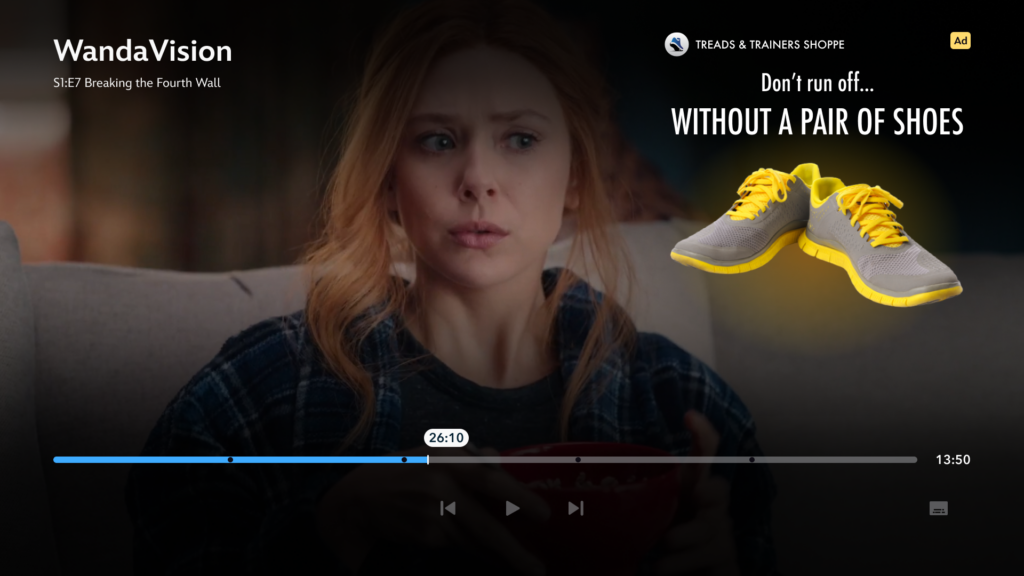
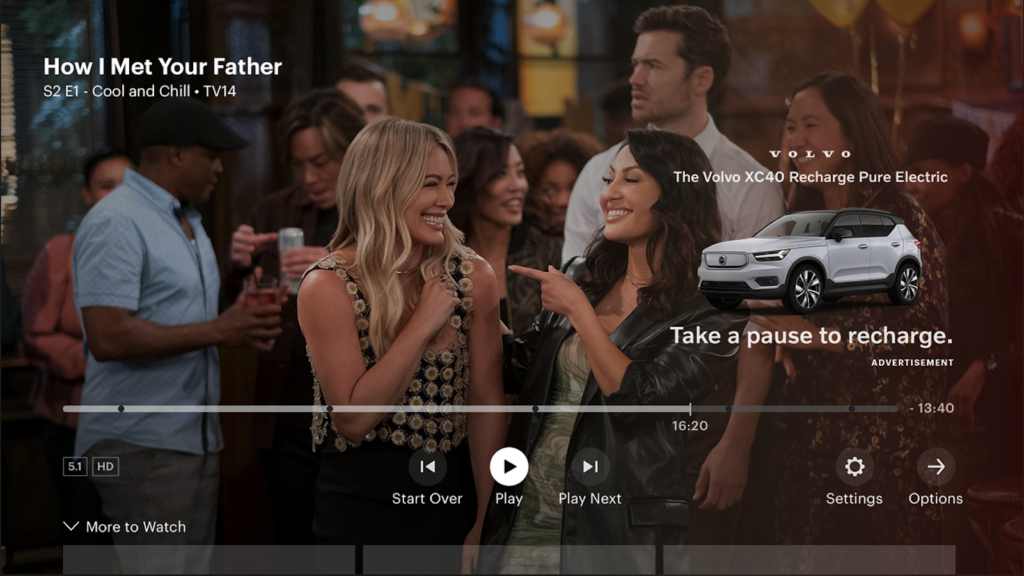
 El anuncio Pause de Disney ofrece a los anunciantes una oportunidad única de conectar con los espectadores a través de la relevancia situacional: el acto de presionar pausa.

El anuncio Pause permite a los especialistas en marketing entregar mensajes relevantes a los consumidores en el momento y lugar adecuados, durante una pausa natural determinada por el usuario en la narrativa. También permite a los anunciantes crear y ser dueños de una experiencia positiva y entretenida para el espectador.

Tiempo de entrega

 12 días hábiles a partir de la recepción de los recursos y el texto final.
Disponible en:

Plataformas:

Entregables

  • To maximize visibility and legibility, we highly recommend using an all-white version of your brand logo.

  • If possible, please send both a horizontal and a stacked version of your logo to make the best use of the space available.

Recursos estáticos

Logotipo de marca / tratamiento del título

  •  PREFERIDO: Vectorial Adobe EPS o Illustrator (AI)
  • ACEPTADO: Photoshop (PSD) por capas de alta resolución o PNG transparente

Imágenes de apoyo de la campaña / ícono de clasificación

  •  -PREFERIDO: archivos vectoriales Adobe EPS o Illustrator (AI)
  • ACEPTADO: Photoshop (PSD) por capas de alta resolución, JPG o PNG transparente
  • Si se promociona una película, serie o videojuego, es OBLIGATORIO incluir el ícono de clasificación de la MPA, TV o ESRB.

Fuentes (si corresponde)

  • Fuente OpenType (OTF)

Design Deliverables (if Client is Designing)

  • File Format: Transparent PNG
  • Dimensions: 1085 x 770 
  • Please consult the Account Manager for Photoshop (PSD) build file template.
  • If promoting a film, series, or video game, an MPA / TV / ESRB rating bug is REQUIRED. 

Requisitos de diseño creativo

Sin fondos sólidos

  • Las imágenes deben tener fondos transparentes.
  • To maximize visibility and legibility, we highly recommend using an all-white version of your brand logo.

  • If possible, please send both a horizontal and a stacked version of your logo to make the best use of the space available.

Diseñe puntos focales visuales

  • Evite saturar el anuncio con múltiples imágenes. Use una sola imagen para captar la atención del espectador.

Evite usar imágenes recortadas

  • Las imágenes no deben tener bordes recortados ni verse incompletas.

Sin elementos de interfaz de Disney+ o Hulu

  • No use elementos de interfaz ni controles de capas en el diseño, ya que pueden generar confusión en el espectador. Los usuarios podrían ver un ícono de reproducción y pensar que es clicable.

Mantenga el texto en colores claros

  • El texto debe estar en blanco (u otro color claro) para garantizar la legibilidad. El texto de color oscuro no se verá bien sobre el degradado.

Sin CTA ni botones gráficos

  • Se hacen excepciones para los anuncios Pause con códigos QR. Ver más abajo.

Text Legibility (For Hulu)

  • A single deliverable asset gets trafficked across all devices. Therefore, the font size has to remain legible even at the smallest supported breakpoint size (1024px).

Observe Template Boundaries

  • Do not place components outside of the template boundaries. An image used in horizontal layout should not bleed into the vertical template area and vice versa.

Mejores prácticas de texto publicitario

Enfóquese en la relevancia

  • A los usuarios les importará más el anuncio si entienden por qué lo están viendo. Conectar el texto/las imágenes del anuncio con el momento de pausa puede aumentar el interés.

Use mensajes de marca contextuales

  • Evalúe cómo podría funcionar el mensaje de su marca en el estado de pausa.
  • ¿Está ofreciendo algo que el espectador realmente podría hacer mientras su programa está en pausa.
  • ¿Su mensaje de marca tiene algún aspecto relacionado con “tomar un descanso” o “pausar”?
  • ¿Su marca tiene un mensaje relacionado con la ubicación del espectador (sala de estar u otra habitación de la casa)?

Mantenga el texto conciso

  • Los espectadores no quieren ver un gran bloque de texto en la pantalla. Asegúrese de que el mensaje sea claro y directo.

Apoyo creativo

  • Disney brindará comentarios sobre el texto, si se solicita.

Copy

Creative Best Practices

  • Evaluate how brand messaging could function in the pause state.
  • Focus on relevancy.
  • Keep the text concise. Aim to cap at 30 characters or fewer.
  • Hulu will provide copy options if requested.

Text Readability

  • The text should be set in white to ensure readability.
  • Avoid having the messaging run over three lines of text.
  • The style should follow the client’s branding.

Text Legibility

  • Keep in mind that a single asset gets trafficked across all devices. Therefore, the font size has to remain legible even at the smallest supported breakpoint size (1024px).

Heading

  • Lorem ipsum dolor sit amet, consectetur adipiscing elit.
  • Ut elit tellus, luctus nec ullamcorper mattis, pulvinar dapibus leo.

Gradient Color (optional)

Format

  • HEX or RBG Code

Purpose

  • NOTE: Clients can provide HEX values of their brand colors for consideration if they’d like. However, if the brand colors cause the gradient to clash with the creative, they will not be used. The gradient is meant to work as a backdrop to the ad creative and does not need to represent the brand.

Acceptable

  • Black is acceptable but white (or any other light color) is not.

Heading

  • Lorem ipsum dolor sit amet, consectetur adipiscing elit.
  • Ut elit tellus, luctus nec ullamcorper mattis, pulvinar dapibus leo.

Unidades de anuncio con código QR

¿Quién lo crea?

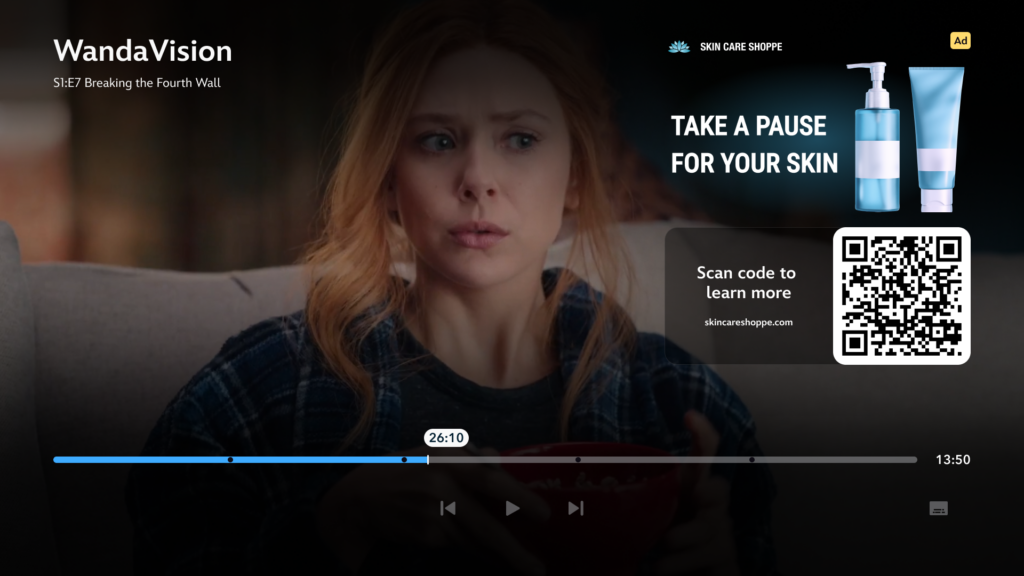
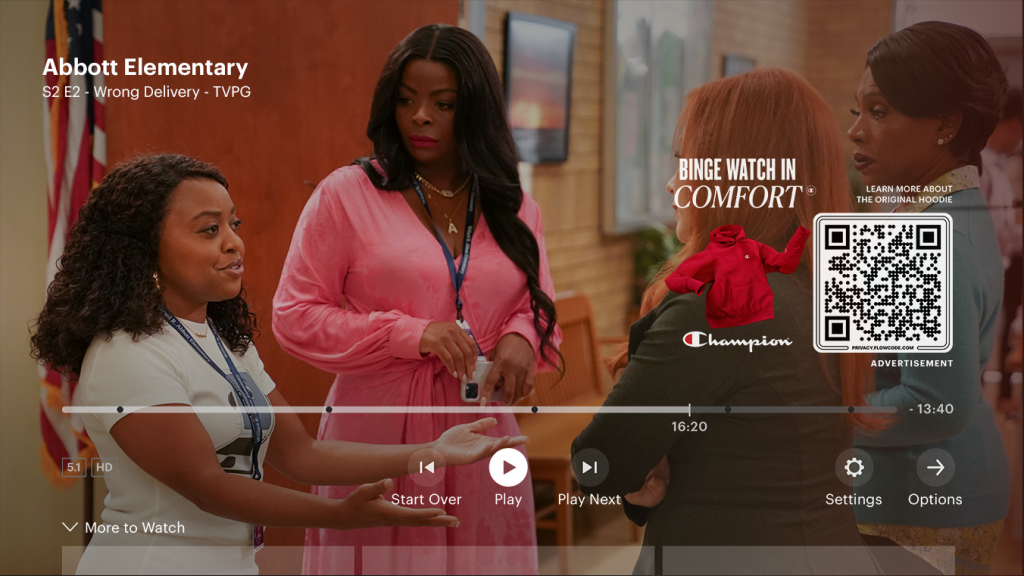
  •  Disney creará el código QR que se utilizará. Los clientes deberán proporcionar la URL de la página de destino a la que se dirigirá al espectador. El enlace de destino puede ser un sitio web, una aplicación o la tienda de aplicaciones (para descargar una app anunciada).

Mejores prácticas para el texto del CTA

  • Las llamadas a la acción escritas son importantes cuando hay un código QR en pantalla. Para fomentar la participación del espectador, recomendamos encarecidamente que los anunciantes usen un CTA contundente.
  • Deben ser claros, atractivos y fáciles de leer rápidamente.
  • Deben ser coherentes con la URL de destino.
  • Incluya lo que el espectador obtendrá al escanear el código: ¿una oferta, una promoción o una experiencia de destino entretenida?
  • Los CTA que transmiten sensación de urgencia u oportunidad de ganar algo son los que mejor funcionan.

Opciones de texto para el CTA

  •  El CTA debe comenzar con “Escanee el código para…”
    • MÁS INFORMACIÓN
    • COMPRAR AHORA
    • OBTENER OFERTA
    • OBTENER CUPÓN
    • VER PRECIOS
    • RESERVAR AHORA
    • POSTULAR AHORA
    • REGISTRARSE AHORA
    • INSCRIBIRSE HOY
    • COMENZAR AHORA
    • RESERVAR
    • OBTENER LA RECETA
    • PROBAR ESTO EN CASA
    • HACER ESTO EN CASA
    • ENCONTRAR UN DISTRIBUIDOR
    • ENCONTRAR UNA SUCURSAL
    • VER HORARIOS
    • OBTENER BOLETOS
    • DESCARGAR AHORA
    • ESCUCHAR AHORA
    • PEDIR AHORA
    • RESPONDER PREGUNTA
    • JUGAR TRIVIA
  • Para usar un CTA que no esté incluido en la lista anterior, se requiere aprobación del área de producto/legal.

URL personalizada

  •  El código QR debe tener debajo una URL abreviada.
  • Cantidad máxima de caracteres: 30 (incluyendo espacios)
  • Ejemplo: ubereats.com

Etiquetas de seguimiento de terceros y alojamiento de archivos

Etiquetas de seguimiento

  •  Los clientes pueden proporcionar píxeles 1×1 de terceros.

Alojamiento de archivos

  •  Los archivos son alojados por Disney.

Heading

  • Lorem ipsum dolor sit amet, consectetur adipiscing elit.
  • Ut elit tellus, luctus nec ullamcorper mattis, pulvinar dapibus leo.

Heading

  • Lorem ipsum dolor sit amet, consectetur adipiscing elit.
  • Ut elit tellus, luctus nec ullamcorper mattis, pulvinar dapibus leo.
The use of Graphik is acceptable in cases where the Client cannot supply their own typeface.
On living room, mobile, and tablet devices, the color gradient overlay is dynamic and will change based on the cover story art. It is not something we can control on our end.
If the tagline/date messaging doesn’t fit within the 11 syllables max, it can be included as text.
Stress mark should be marked with [capitals] to indicate the primary stressed syllable, as in: news・pa・per [NOOZ-pey-per] in・for・ma・tion [in-fer-MEY-shuhn]
  • No symbols such as registered marks, copyrights, etc.
  • If symbols are required, they will be presented in standard text such as” Brand (TM)”

Q: Why do you prefer PCM codec?

A: PCM codec is lossless audio quality, so whenever possible, please deliver PCM audio.

Q: What does native frame rate mean?

A: Native frame rate refers to the frame rate the source footage was shot. Whenever possible, we require all videos to be delivered in their native frame rate. This means that no frame rate conversion should be performed, which includes adding 3:2 pulldown for broadcast.

Q: Should the bitrate be constant if delivering ProRes codec?

A: No, since ProRes codec is built to be variable, this is waived.

Q: Can you accept bitrate higher than 30 Mbps?

A: Yes, we can accept bitrate beyond the recommended range for H.264 and ProRes. In the case of ProRes, bitrate will often exceed 30 Mbps due to its variable setting.

Q: When is letterboxing allowed and not allowed?

A: When the native aspect ratio is 1.78:1 or 1.33:1 throughout the entire program, there should not be any letterboxing (black bars on top and bottom). We should see an active picture take up the full frame. If the aspect ratio is wider than 1.78:1, such as 2.35:1, matting on the top and bottom is permissible. Additionally, if there is a creative choice to add matting or if there is a mix of native aspect ratios, this is usually waived, but please reach out to your Hulu representative to confirm.